
Hi friends!
In the last post, we talked about lessons learned in 2021. Now I think many of us are ready to look toward the future and manifest some amazing things for 2022! In this post, we’ll dive into a few of my favorite things: Vision boards, manifesting, and words of the year.
Now if you know me, you know I’m into all the crafty things. Give me some glue, paper, and markers and I won’t come out of the room for a day. Anyone else spend hours and hours with their childhood friends making huge poster boards filled with magazine images of their favorite bands, glittery backgrounds, and Jonathan Taylor Thomas (JTT)? Shout out to my 6th grade BFF, Danielle, for doing with this with me.
I look at those poster boards from 20 years ago as the training ground for making vision boards as an adult. And while I usually make real vision boards with paper and pen, this year I decided to try something new and create a digital vision board with Canva that I’ll use as my phone background.
Below are the steps to creating your own 2022 digital vision board:
- The first step to manifesting is to get clear on what it is that you want. I wrote a bulleted list of about 20 things I want to happen in 2022 including places I want to go, goals I have for the year, hobbies I want to do more of, people I want to be with, feelings I want to have, etc.
- Second, you’ll want to decide on the general layout of the vision board. I used a Canva layout from this page as the base.
- Next, decide if you’re going to stick with a color theme. One major benefit of creating a virtual vision board is that it’s easier to choose photos from the same color family than if you were cutting pages out of a magazine because there are more photo options online to choose from.
- Now is the fun part where you’ll find your photos. I chose a pink and white theme for my virtual vision board, so I searched in Canva for images like “rose quartz,” “pink ocean,” and “white flowers” to find the perfect photos that matched my vision. If you can’t find ones you love on Canva, there are other free photo sites like Pixabay.com that you can get great quality images from.
- Next, drag and drop your photos to the location you want them to be in. If you are layering them on top of each other, click “position” on the top right if you want to move the photo in front or behind another one.
- You may want to also add in words using Canva’s “Text” function. The word I chose for 2022 is “fun,” so I included that word on my board. If you’re looking for some more word of the year inspiration, a few past words of mine have been community, connection, and joy. I also love the idea of adding in an affirmation, so I chose one of my favorites: “I lead with kindness.”
- Once you’re happy with your design, you can download it and add it as your phone background. The size that worked for my iPhone was 1080 (width) x 1920 (height) px. You can resize your design through Canva for a different type of phone or you can make it your computer background. Another great option if you love having a physical item is to print your design and have it both digitally and in your office or bedroom.
Here is my 2022 digital vision board:
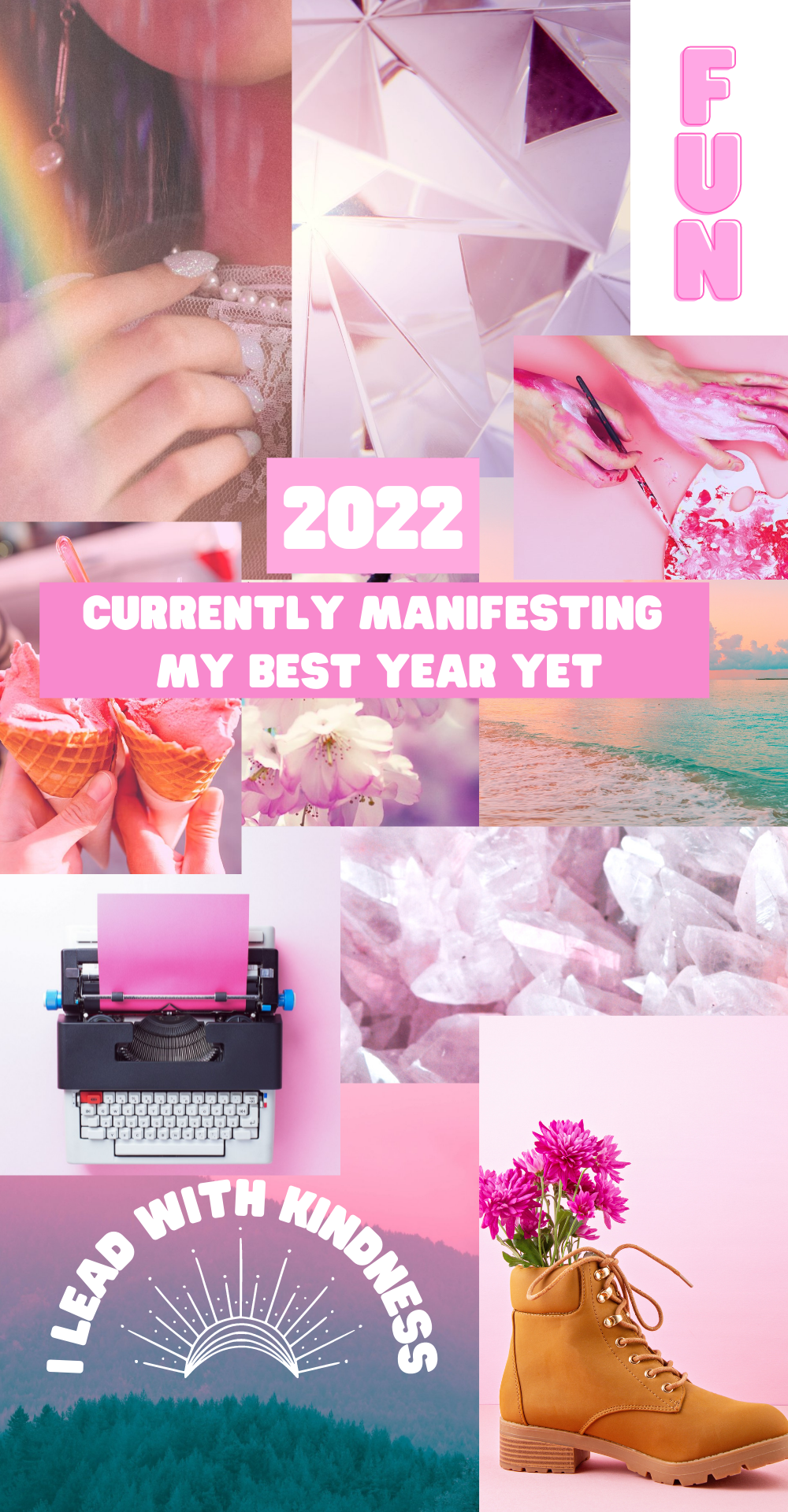
This vision board includes many of the things I want to fill 2022 with: Art, gardening, giving flowers, community (as noted by the ice cream cones), writing on this blog (the typewriter), fun, kindness, nature (the beach and mountains), and as many crystals as my pockets can hold. I just love seeing it every time I look at my phone as a reminder of what I’m calling into my life.
Feel free to use this for your phone vision board if you like it. You can make changes to it by clicking here.
Are you planning to make a vision board this year? I’d love to see yours!
 happsters.com